
Setting up a Polycom VVX400 Series Phone using Talk provisioning server
Search Knowledge Base by Keyword
Note: this will only work for phones with mac addresses that have already been setup for remote provisioning. Please contact us if you are looking to deploy a new phone that was not shipped by us.
Step 1: Reset to factory default
- please turn over the phone and take a picture of the ID string on the bottom of the unit. It should start with 64.
- connect the phone to the network and press press the cancel button (last from right) when application begins to load
- during the countdown process press and hold 1, 3, and 5 dial pad keys.
- This will bring up the enter password prompt
- Enter the ID string from the picture from first step. Please note the 1->Aa button. This is used to toggle between numbers, caps and lower case. See example below
- Here are the exact keystrokes to reset a phone with an example MAC Address of 00-04-F2-AA-81-4C
Character Actions 0 Press the ‘0’ key once 0 Press the ‘0’ key once 0 Press the ‘0’ key once 4 Press the ‘4’ key once f Select the input modifier once to toggle into lower case letter mode Press the ‘3’ key three times quickly 2 Select the input modifier twice to toggle back into numeric mode Press the ‘2’ key once a Select the input modifier once to toggle into lower case letter mode Press the ‘2’ key once Wait for two seconds for the blinking cursor to return a Press the ‘2’ key once 8 Select the input modifier twice to toggle back into numeric mode Press the ‘8’ key once 1 Press the ‘1’ key once 4 Press the ‘4’ key once c Select the input modifier once to toggle into lower case letter mode Press the ‘2’ key three times quickly - Press OK
- If String ID entered properly a message will display that config has been reset
- The phone will reboot
Step 2: upgrade phone to latest software from Polycom
- Obtain the phone’s IP address by clicking on the menu button (right of keypad), then selecting network from the screen using the arrow keys and then TCP/IP parameters.
- Using a browser, navigate to the phone’s config using https://IP_ADDRESS_OF_PHONE (notice the https). Browser will display a security warning, which can be ignored and proceed to the url.
- Login as Admin with password as set above
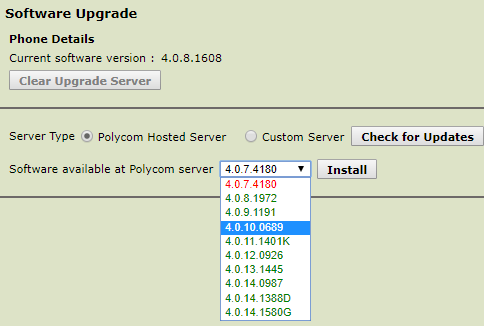
- From the Utilities menu select Software Upgrade
- Click ‘Check for Updates’ button
- select the latest version in green at the bottom of the list
- Click the ‘Install’ button
- the phone will reboot
Set Provisioning server url of Talk provision HTTPS server
- IP address should display on phone during restart. IP can also be retrieved after phone is up and running by clicking the home button on phone -> select settings -> status -> Network -> TCP/IP parameters.
- Using a browser, navigate to the phone’s config using https://IP_ADDRESS_OF_PHONE (notice the https). Browser will display a security warning, which can be ignored and proceed to the url.
- Login as Admin with password 456. Phone will ask for new admin password, please provide one as required (we usually use 4567).
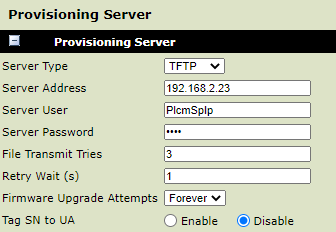
- From the top menu select Settings -> provisioning server
- Fill in the form below. Make sure to select HTTPS from the Server Type pull down list
- Fill in the server address hostname as provided
- Fill in the Server User / Password as provided
- Click save on the bottom
- The phone should automatically restart and register itself, if it does not please reboot it using Utilities -> reboot phone
Share